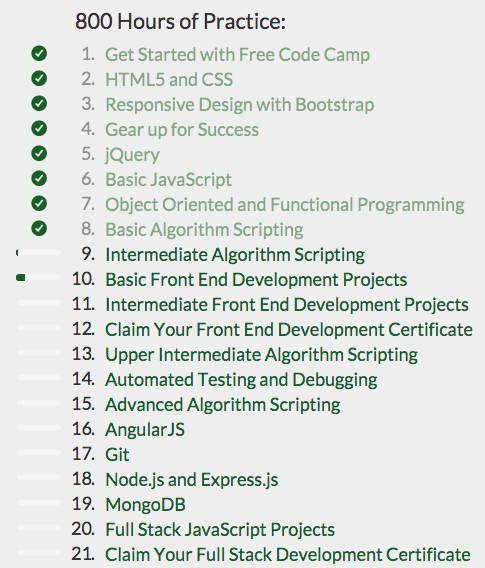
I like the changes made to the curriculum, it's a good idea to let us continue with the intermediate problems while the material from the earlier problems is still fresh in our mind.
Anyhow, back to the portfolio project. So, I worked with buttons and their alignment for about an hour or so, but I didn't like the results, I prefer my original design, so I'm sticking with that and moving on.
Okay, so I'm looking for a way to set up the actual portfolio showcase, I think this is done by using something called iframes, but I'm not sure yet. Oh, I gave the navbar and the background images a minimum width.
I downloaded the window re-sizer extension for Google Chrome. It's neat, it allows you to resize your browser window to specific sizes, which is a nice tool to have for web development.
Note that in the below code:
#homepic {
background: url('http://i59.tinypic.com/10yqlbo.jpg') no-repeat 50% 50% ;
background-size: cover;
-moz-background-size: cover;
-o-background-size: cover;
-webkit-background-size: cover;
height: 100%;
width: 100%;
position: absolute;
top: 0px;
left: 0px;
display: block;
}
I changed the top value to 0px. It was previously at 50px, in case I need to change it back. The reason I note this is because codepen has a small bar across the bottom of the screen, and I'm not sure how the page will actually look in an actual browser, so I'll come back to this note if the bar has content beneath it. I'm pretty sure it does not have content beneath it, and I think that solved the problem I was having.
O.k., I've been working on this quite a bit, check out my portfolio page so far:

Neat! And when you hover over the images of my projects (which are also links to those projects on github via rawgit), the image becomes larger, for a neat pop-up effect, but only slightly larger, as I wanted the effect to be subtle.
All right, I finished the portfolio page project. Here's the home page:

The portfolio page remains as above, and then here's the about page:

Here's the contact page:

And here's a link to the CodePen. So, as far as future improvements, I want to add to the contact me section to enable someone to submit a message to me via a form and perhaps change the background for some of the sections. I learned a lot, and was also able to apply a lot of thing I already knew, by working on this project. Here's the final code for this iteration:
HTML:
<body>
<nav class="navbar navbar-default navbar-fixed-top">
<div class="container-fluid">
<div class="navbar-header">
<button type="button" class="navbar-toggle" data-toggle="collapse" data-target="#myNavbar">
<span class="icon-bar"></span>
<span class="icon-bar"></span>
<span class="icon-bar"></span>
</button>
<a class="navbar-brand texttopname" href="#" id="brand">Adan Camacho | Web Dev</a>
</div>
<div class="collapse navbar-collapse"id="myNavbar">
<ul class="nav navbar-nav navbar-right">
<li class="active"><a href="#homepic" class="texttop" id="Home">Home</a></li>
<li><a href="#portfoliopic" class="texttop" id="Portfolio">Portfolio</a></li>
<li><a href="#aboutpic" class="texttop" id="About">About</a></li>
<li><a href="#contactpic" class="texttop" id="Contact">Contact</a></li>
</ul>
</div>
</div>
</nav>
<div class="container-fluid">
<div id="homepic">
<button type="button" class="btn btn-default firstblockbutton"><img src="http://i59.tinypic.com/jaudyh.png" border="0" alt="Image and video hosting by TinyPic" class="imageSpacing"><a href="http://freecodecamp.com/adancode" id="link1" target='_blank'>freeCodeCamp</a></button>
<button type="button" class="btn btn-default blockbutton"><img src="http://i59.tinypic.com/2s68uav.png" border="0" alt="Image and video hosting by TinyPic" class="imageSpacing"><a href="http://adancode.blogspot.com/" id="link2" target='_blank'>Blogger</a></button>
<button type="button" class="btn btn-default blockbutton"><img src="http://i58.tinypic.com/10i77zb.png" border="0" alt="Image and video hosting by TinyPic" class="imageSpacing"><a href="http://github.com/Adancode" id="link3" target='_blank'>GitHub</a></button>
<button type="button" class="btn btn-default blockbutton"><img src="http://i60.tinypic.com/2ufqec5.jpg" border="0" alt="Image and video hosting by TinyPic" class="imageSpacing"><a href="http://twitter.com/Adancode" id="link4" target='_blank'>Twitter</a></button>
<button type="button" class="btn btn-default blockbutton"><img src="http://i62.tinypic.com/a4yjx4.png" border="0" alt="Image and video hosting by TinyPic" class="imageSpacing"><a href="http://www.linkedin.com/in/adancamacho" id="link5" target='_blank'>LinkedIn</a></button>
<button type="button" class="btn btn-default blockbutton"><img src="http://i60.tinypic.com/35k93ch.png" border="0" alt="Image and video hosting by TinyPic" class="imageSpacing"><a href="http://www.facebook.com/adan.camacho" id="link6" target='_blank'>Facebook</a></button>
</div>
<div id="portfoliopic">
<div class="container-fluid text-center">
<div class="container-fluid portWrap">
<div class="one portContainer"><a href="https://rawgit.com/Adancode/google-homepage/master/index.html"><img src="http://i58.tinypic.com/2dl4zvd.png" border="0" alt="Image and video hosting by TinyPic" class="img-responsive"></a></div>
<div class="two portContainer"> </div>
<div class="three portContainer"> </div>
</div>
<div class="container-fluid portWrapLow">
<div class="four portContainer"> </div>
<div class="five portContainer"> </div>
<div class="six portContainer"> </div>
</div>
</div>
</div>
<div id="aboutpic">
<div id="aboutMiniPic" ><img src="http://i61.tinypic.com/2iuxd92.jpg" border="0" alt="Image and video hosting by TinyPic" class="center-block img-responsive" id="myPic"></div>
<div id="aboutParagraph">
<h4 class="aboutTitle">About</h4>
<h4>Hi, I'm Adan Camacho! This is my portfolio page where I share some of my favorite work. I've been studying web development since March of 2014 through Team Treehouse, The Odin Project, and Free Code Camp, as well as other sources. I love learning and I'm enjoying every minute of being a web developer! </h4>
<h4 class="aboutTitle">Professional Background</h4>
<h4>I attended the University of Texas at Brownsville and graduated with a B.A. in Government, Cum Laude. I also graduated first in my military class in both the physical and academic exams. I then attended law school at Creighton University School of Law, but withdrew after two years, taking a position as a stock broker with TD Ameritrade's Technology Division for several years before becoming a successful entrepreneur.</h4><h4>Thanks for dropping in!</h4>
</div>
</div>
<div id="contactpic">
<div id="contactBox">
<h4 class="aboutTitle">Contact me at:</h4>
<h4>adancamacho8@gmail.com</h4>
<div>
</div>
</div>
</div>
</body>
CSS:
.navbar {
border-bottom: 2px solid #512D0F;
border-top: 2px solid #512D0F;
font-size: 14px;
min-width: 320px;
}
#homepic, #aboutpic, #portfoliopic, #contactpic {
min-width: 320px;
}
div#homepic{
background: url('http://i59.tinypic.com/10yqlbo.jpg') no-repeat 50% 50% ;
background-size: cover;
-moz-background-size: cover;
-o-background-size: cover;
-webkit-background-size: cover;
height: 500px;
width: 100%;
position: absolute;
top: 0px;
left: 0px;
display: block;
}
div#portfoliopic{
/*
background: url('http://i59.tinypic.com/10yqlbo.jpg') no-repeat 50% 50% ;
background-size: cover;
-moz-background-size: cover;
-o-background-size: cover;
-webkit-background-size: cover;
*/
height: 1500px;
width: 100%;
position: absolute;
top: 500px;
left: 0px;
display: block;
}
div#aboutpic{
/*background: url('http://i59.tinypic.com/10yqlbo.jpg') no-repeat 50% 50% ;
background-size: cover;
-moz-background-size: cover;
-o-background-size: cover;
-webkit-background-size: cover;*/
height: 1300px;
width: 100%;
position: absolute;
top: 2000px;
left: 0px;
display: block;
}
div#contactpic{
background: url('http://i59.tinypic.com/10yqlbo.jpg') no-repeat 50% 50% ;
background-size: cover;
-moz-background-size: cover;
-o-background-size: cover;
-webkit-background-size: cover;
height: 600px;
width: 100%;
position: absolute;
top: 3100px;
left: 0px;
display: block;
}
/*
.spacer {
display: block;
background: white;
height: 100px;
color: red;
}
*/
.texttop {
color: #512D0F;
}
.texttop:hover {
color: #512D0F;
font-weight: bold;
}
#Home, #About, #Portfolio, #Contact {
color: #512D0F;
background: #F8F8F8;
}
#Home:hover, #About:hover, #Portfolio:hover, #Contact:hover {
background-color: #F8F8F8;
}
#brand {
color: #512D0F;
}
body{
margin: 0 auto;
}
#link1, #link2, #link3, #link4, #link5, #link6 {
color: #512D0F;
}
.firstblockbutton {
display: block;
margin-left: 3%;
margin-right: auto;
margin-top: 180px;
border: 3px solid #512D0F;
width: 160px;
color: #512D0F;
}
.blockbutton {
margin-left: 3%;
margin-top: 5px;
display: block;
border: 3px solid #512D0F;
width: 160px;
color: #512D0F;
}
.blockbutton:hover {
border: 3px solid #512D0F;
color: #512D0F;
font-weight: bold;
}
.firstblockbutton:hover {
border: 3px solid #512D0F;
color: #512D0F;
font-weight: bold;
}
.imageSpacing {
margin-right: 10px;
}
@media only screen and (min-width: 480px) {
div#homepic {
background: url('http://i59.tinypic.com/10yqlbo.jpg') no-repeat 50% 50% ;
background-size: cover;
-moz-background-size: cover;
-o-background-size: cover;
-webkit-background-size: cover;
height: 800px;
width: 100%;
position: absolute;
top: 0px;
left: 0px;
display: block;
}
div#portfoliopic {
background: url('http://i59.tinypic.com/10yqlbo.jpg') no-repeat 50% 50%;
background-size: cover;
-moz-background-size: cover;
-o-background-size: cover;
-webkit-background-size: cover;
height: 800px;
width: 100%;
position: absolute;
top: 800px;
left: 0px;
display: block;
}
div#aboutpic {
background: url('http://i59.tinypic.com/10yqlbo.jpg') no-repeat 50% 50%;
background-size: cover;
-moz-background-size: cover;
-o-background-size: cover;
-webkit-background-size: cover;
height: 1000px;
width: 100%;
position: absolute;
top: 1600px;
left: 0px;
display: block;
}
div#contactpic {
background-color: white;
height: 800px;
width: 100%;
position: absolute;
top: 2600px;
left: 0px;
display: block;
}
}
#link1:hover, #link2:hover, #link3:hover, #link4:hover, #link5:hover, #link6:hover {
text-decoration: none;
color: #512D0F;
}
#link1:link, #link2:link, #link3:link, #link4:link, #link5:link, #link6:link {
text-decoration: none;
}
/*Mobile First Portfolio Code Below*/
#portfolioFrames {
height: 150px;
width: 200px;
}
.one {
margin-right: 3%;
}
.two {
margin-right: 3%;
}
.three {
}
.portWrap {
margin-top: 110px;
}
.portWrapLow {
margin-top: 30px;
margin-bottom: 110px;
}
.four {
margin-right: 3%;
}
.five {
margin-right: 3%;
}
.six {
}
.img-responsive {
height: 197px;
width: 100%;
}
.portContainer {
background-color: #A52A2A;
display: block;
width: 100%;
height: 205px;
border: 4px solid #512D0F;
border-radius: 5px;
margin-bottom: 10px;
}
.portWrapLow {
margin-top: 0px;
margin-bottom: 110px;
}
/*Portfolio Code Media Query*/
@media only screen and (min-width: 480px) {
#portfolioFrames {
height: 150px;
width: 200px;
}
.one {
margin-right: 3%;
}
.two {
margin-right: 3%;
}
.three {
}
.portWrap {
margin-top: 110px;
}
.portWrapLow {
margin-top: 30px;
margin-bottom: 110px;
}
.four {
margin-right: 3%;
}
.five {
margin-right: 3%;
}
.six {
}
.img-responsive {
height: 197px;
}
.portContainer {
background-color: #A52A2A;
display: inline-block;
width: 28%;
height: 205px;
border: 4px solid #512D0F;
border-radius: 5px;
}
}
.portContainer:hover {
-webkit-transform:scale(1.05); /* Safari and Chrome */
-moz-transform:scale(1.05); /* Firefox */
-ms-transform:scale(1.05); /* IE 9 */
-o-transform:scale(1.05); /* Opera */
transform:scale(1.05);
}
#myPic {
border: #512D0F solid 4px;
border-radius: 10px;
margin-top: 80px;
width: 300px;
height: 300px;
display: block;
}
/*About Page Media Query*/
@media only screen and (min-width: 480px) {
#myPic {
margin-left: 2%
}
}
#aboutParagraph {
color: #512D0F;
padding-right: 5%;
padding-left: 5%;
padding-top: 3%;
padding-bottom: 3%;
margin-left: 2%;
margin-right: 2%;
margin-top: 10px;
background: white;
border: #512D0F solid 4px;
border-radius: 10px;
}
.aboutTitle {
font-weight: bold;
}
#contactBox {
margin-top: 100px;
border: #512D0F solid 4px;
border-radius: 10px;
background: white;
color: #512D0F;
padding-right: 5%;
padding-left: 5%;
padding-top: 3%;
padding-bottom: 3%;
margin-left: 2%;
margin-right: 2%;
}
I'm really liking FCC.
For now, I'm moving on to the next project!
SUMMARY OF CODING SKILLS
Total Treehouse Points: 5,385
Treehouse Points by Subject Matter (Miscellaneous not included):
HTML: 663
CSS: 1,599
Design: 1,193
Development Tools: 747
JavaScript: 1,120
Treehouse Ranking (%): "You have more total points than 94% of all students."
Treehouse Badge(s) Earned Today:
Treehouse Courses Completed:
How to Make a Website
HTML
CSS Foundations
CSS Layout Techniques
Aesthetic Foundations
Design Foundations
Adobe Photoshop Foundations
Adobe Illustrator Foundations (66% complete, switched focus from web design to web dev)
Git Basics
Introduction to Programming
JavaScript Basics
Codecademy (& other) Courses Completed:
HTML and CSS (Codecademy)
Design Foundations
Adobe Photoshop Foundations
Adobe Illustrator Foundations (66% complete, switched focus from web design to web dev)
Git Basics
Introduction to Programming
JavaScript Basics
Codecademy (& other) Courses Completed:
HTML and CSS (Codecademy)
Books Read or in Progress:
Completed: "Head First HTML and CSS," by E. Robson & E. Freeman (768 pgs.)
In Progress: "Head First JavaScript," by Eric Freeman and Elisabeth Robson (on pg. 56)
Completed: "A Smarter Way to Learn JavaScript," by Mark Myers (293 pgs., 89 chapters with 20 questions/problems per chapter, for a total of 1,780 coding questions/problems answered)
My Progress on The Odin Project:
1. Introduction to Web Development 100% Complete
2. Web Development 101 33% Complete
Note: Switched to FCC for the great online community and better updates/support.
Note: Switched to FCC for the great online community and better updates/support.
My Progress on Free Code Camp (FCC):
1. HTML5 and CSS Complete
2. Responsive Design with Bootstrap Complete
3. jQuery Complete
4. Basic JavaScript Complete
5. Object Oriented and Functional Programming Complete
6. Basic Algorithm Scripting Complete
7. Basic Front End Development Projects On 3 of 5
8. Intermediate Algorithm Scripting
9. Upper Intermediate Algorithm Scripting
10. Automated Testing and Debugging
11. Advanced Algorithm Scripting
12. AngularJS
13. Intermediate Front End Development Projects
14. Git
15. Node.js and Express.js
16. MongoDB
17. Full Stack JavaScript Projects
After the FCC work above (estimated to take 800 hours), there are 800 more hours of coding projects on behalf of non-profits, which, in addition to contributing to the common good, provide us an opportunity to expand our networks and build a robust portfolio.
Hours Spent Coding Since Last Session: 11
Total Hours Coding: 681